worklore.dev · all stories · authors · paths · skills & mcp · about
Build and ship your own MCP server
One MCP server from idea to listed, in build order. Already have a server? Start with the first step: a read-only checkup that tells you which of the later steps you actually need. Fifteen of the steps are full stories with the exact commands, the real error strings and a contract your own agent can run — those are the days that actually cost something. The other ten are short reads that tell you why a step exists and which decisions you cannot take back. Read the stories; the plain steps are the connective tissue.
Why bother with an MCP server
An MCP server is the difference between "here is our API, go read the docs" and the user's agent just doing the thing while they talk to it. You publish a handful of tools; anyone running Claude, ChatGPT, Cursor or another MCP client connects once and their agent can call you from then on — no SDK for them to install, no glue code for them to write.
That is the upside. The honest downside: an MCP server is a public, unauthenticated-by-default surface that strangers' agents will call, and everything that makes it safe — sign-in, permissions, rate limits, logging — is yours to build. The protocol itself is the small part.
Before writing any code, settle three things:
- Which 4–8 tools would you actually want an agent to have?
- Do those tools only read, or do they also write?
- Does a caller need to be signed in to use them?
Every decision later in this path follows from those three answers.
One more question before any of this: are you sure you need a server at all?
The cheaper alternative is a skill — a file of instructions the user installs, which their agent reads and follows. It costs nothing to host, has no security surface, and can carry far more nuance than a tool description ever will, because it arrives as prose in the agent's context instead of a one-paragraph summary.
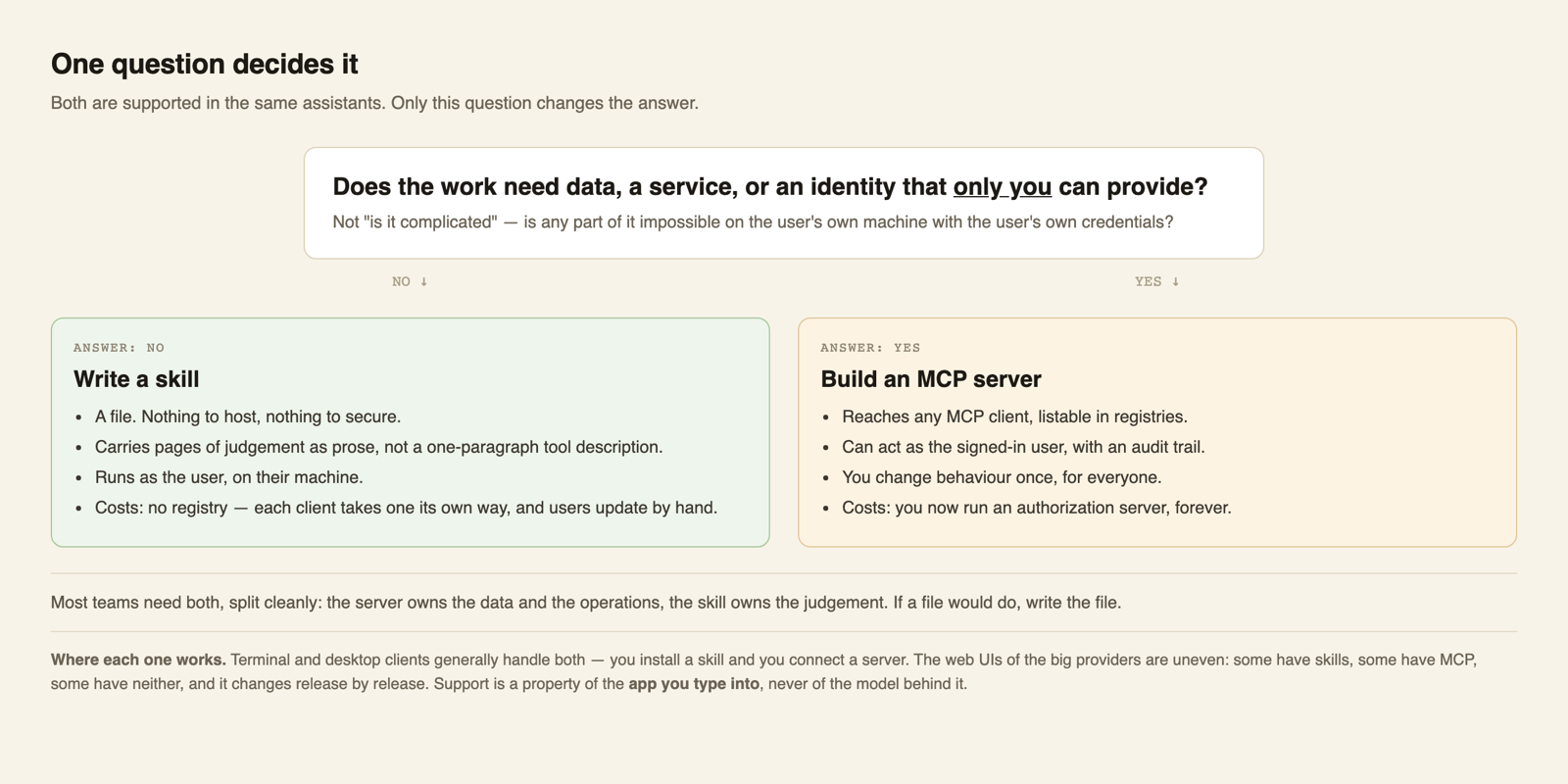
The honest test is where the work has to happen. If everything your integration needs is already on the user's machine or on the public web, and they can do it with their own credentials, write the skill. You need a server when:
- the work needs data or a service only you can run — a live database, a scanner, a paid API
- it has to act as the user, which means sign-in, permissions, and an audit trail
- you want reach beyond one agent family, since a skill only works where skills are supported
- you need to change behaviour for everyone at once, without asking anyone to update a file
- you want to be findable in registries and directories
They are not exclusive, and the strongest setups use both, with a clean division: the server owns the data and the operations, the skill owns the judgment. worklore is built this way. The server answers what stories exist and what a given skill can actually do, because that needs live data and a scanner running somewhere. A separate skill carries the editorial process for writing a story — how to choose a title, what to strip before publishing, when to stop and wait for the author — which is thousands of words of judgment that no tool description could hold.
The asymmetry worth weighing: a skill is a file. A server is an authorization surface you own for as long as it is up. If a file would do, write the file.
A note on how to read this path: the steps that look like this one explain why something exists. The steps marked as stories are the ones with the commands, the error messages and a contract your agent can execute. If you only have time for one kind, read the stories.
Name your tools before you write them — this one is a one-way door
This is the one decision on this whole path you cannot take back, so it gets its own step.
Directory scorecards reward tool names that read as a navigable tree — a dotted path like stories.search — and penalise both a flat list and a deeply nested one. My listing scores 98/100 and those are the missing two points.
Do not take them. A function name in the major model APIs must match this, exactly:
- ^[a-zA-Z0-9_-]{1,64}$
Letters, digits, underscore, hyphen. No dots. Some clients rename a dotted name on their side (Claude Code, for example, turns it into mcp__<server>__stories_search), but a client that passes tool names straight through to a model API gets a 400, and your tool simply does not exist for it. You don't control which kind of client your users have. So the scorecard asks for something that breaks some of the very clients the listing exists to reach. Fail that criterion on purpose.
What you can do instead is pick one grouping convention and apply it without exception, so the structure stays readable with an underscore as the separator — stories_search, stories_publish, capability_check. Decide it before you write the first tool and write it down.
Why it cannot wait: the moment your server is scanned by a registry, listed in a browsable directory, and accepted into an AI client's own app directory, every tool name you published is a name you have to keep. The listings carry it, the submissions carry it, and other people's saved configurations carry it. Renaming is not a refactor at that point — it is a migration across systems you do not control.
Optional deep research: test your tool design before you build it
The advice about tool design (keep the tool list small, group by noun, mind the names) is mostly reasoning, not measurement. No study puts a number on "small". The hard limits are in the clients: Cursor used to stop at 40 tools, Windsurf stops at 100, VS Code and Vertex at 128. Clients that search or defer tools load only the few a task needs, so a large catalog can be fine there. A server with 40 tools is not wrong by default; it is a decision worth testing. If the decision matters for your server, you can test it before writing a line of it.
The next story builds a fake server from the tool list you are planning, gives it real names and descriptions but fake results, and runs the same tasks through Claude Code, Codex and Gemini on your own subscriptions. The server's call log is the judge, so you see which tool each agent actually picked, what it cost in tokens, and where it guessed.
It is optional and it is real work: an afternoon to set up, a few hours of runs. Skip it for a small server with obvious tools. Do it when you are about to choose between many separate tools and a few grouped ones, or when your users live in different clients: those clients do not load your tools the same way, and the same design can be cheap in one and expensive, or less accurate, in another.
What the official docs already cover
An MCP server speaks JSON-RPC. A client asks it to introduce itself, asks for the list of tools it offers, then calls those tools one at a time. For a server other people reach over the internet you want the streamable HTTP transport — one endpoint handles all of it. Local-only servers use stdio, simpler but never leaves your machine.
Each tool needs a name, a description written for an agent rather than a human, and a schema for its inputs. Say plainly in the metadata whether it only reads or can also change things — clients show that to the user before they approve a call.
That much is well documented and rarely where you lose days. What it does not tell you is what the thing will cost to keep running, or where it should live — which is the next question, and the one after it is a real server that answers it.
What it costs to run, and where you'd put it
Two questions arrive together, and the official docs answer neither: what does this cost to keep running, and where should it live? Here is the shape of both.
An MCP server is a small, bursty HTTP service. It sits idle most of the time and wakes up when somebody's agent calls it. That profile fits serverless well: a single function behind an HTTPS endpoint, with a database that charges per request rather than per hour. Concrete numbers from this one: the MCP endpoint is a route on a Lambda that already existed, so marginal compute is pennies a month and the free tiers swallow it. Listing in the official MCP Registry is free. Submitting a ChatGPT app is free. The only line item that is not free is the Claude connector directory, which needs a Team organisation — about $40/month with a two-seat minimum. A container that runs around the clock is the wrong default — it costs more while idle than the requests ever will.
The real recurring cost is not compute. It is that you now run an authorization server, so you own its security; that every client release can surface a new incompatibility; and that without request logging you will have no idea who calls what, which makes every later decision guesswork. Budget for a logging and metrics path from the first deploy, not after something goes wrong — there is a story further down that does exactly that, and it found a live client failure on day one.
What the docs do not answer is where the thing should live: a new service, or the backend you already run. The next story is that decision, with the actual route, the dependency count, and which part turned out to be expensive.
Now drive it yourself: the MCP Inspector
You have a server that answers. Before any real client sees it, drive it yourself.
The MCP Inspector is a test client for your own server: you point it at your endpoint and drive it by hand, with no model in the loop. It lists your tools exactly as an agent receives them, builds a form from each input schema so you can call a tool with arguments you type, and prints the raw protocol traffic underneath. When a real client simply does not call your tool, you cannot tell from outside whether your description was vague, your schema was malformed, or the server errored — three bugs that look identical. Taking the model out of the loop separates them.
It also runs a portability check over your schemas, which is how you find the problems nothing in your own test suite is looking for:
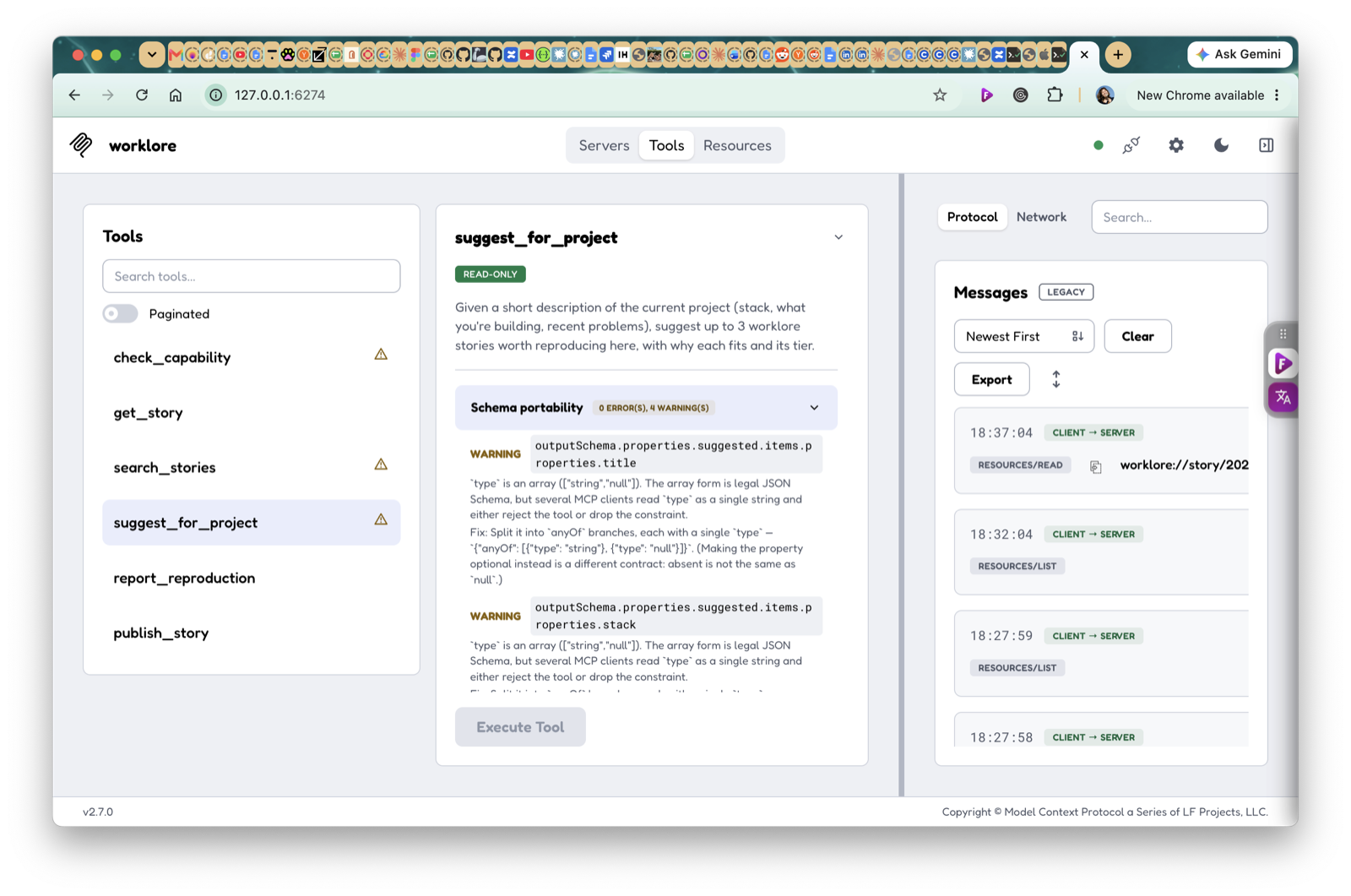
A schema can be perfectly valid JSON Schema and still be read wrongly by real clients — the classic is writing a nullable field as one type with two entries instead of two branches with one type each. Valid, and quietly dropped or rejected by some clients. Your own tests will not catch it, because they use your own assumptions.
Connect here before any real client does, and read your tool descriptions back as a stranger would. One caution if your server has write tools — the Inspector really runs them. Pressing execute on a publish tool publishes.
The Inspector is a check you run once, by hand, before shipping. The next story is the same job made permanent: a test that talks to your server the way a client does and fails the build when it stops telling the truth. It found a tool of mine that had been broken in production for days behind seventy-nine passing tests.
- My tests passed because they agreed with me 2026-09-28
- My MCP server's output schemas accepted wrong answers: 7 of 8 tools, found with mcp-drill 2026-10-15
Four problems that are all really sign-in
From here the path is mostly about identity, and it is worth knowing that in advance, because it does not arrive as one task. It arrives four times wearing a different mask each time, spread across the next several steps, and each one caught me by surprise separately.
- Acting as a person. The moment a tool writes anything, you are not adding a password field — you are running an authorization server: discovery documents, dynamic client registration, PKCE, a consent screen. This is the expensive one.
- Deciding what needs no sign-in at all. Having built the gate, the easy mistake is to put everything behind it, including the list of what your server even offers. That one is invisible until a directory lists you with no tools. And once you start deciding endpoint by endpoint, the decisions drift apart; keep them in one table that every gate reads from.
- Giving a stranger a way in. An app reviewer has to use your server. If your only sign-in is a social provider, there is nothing to hand them, and you will build a sandboxed account under deadline.
- Having the right token yourself. Publishing under an organisation rather than your own name needs a token carrying a scope you probably are not using, and the error will not tell you that.
None of these is hard alone. They are expensive because each one appears to be a small detour from the thing you were actually doing, and there are four of them.
- One table decides what answers without a token: how I stopped re-deciding auth tool by tool 2026-10-06
You may already be done
Everything up to here was building. The server runs, it signs people in, it says what it can do without being asked to prove who you are, and you can see who calls it. That is a finished thing, and plenty of good servers stop exactly here.
What follows is distribution, and it is optional in a way none of the earlier steps were.
If your users already live in a terminal or an IDE, you are done now. Publish the endpoint and one install line in your README — claude mcp add --transport http <name> <url>, or the equivalent for whichever client they use — and they add it themselves in about ten seconds. No forms, no reviewer, no waiting on anybody. For an internal tool, a team server, or anything with a known audience, this is not the lesser option. It is the right one.
Read on if you want the other thing: to appear inside a client's own app directory, where somebody who has never heard of you can find you. That is a different kind of work — a set of documents, a human reviewer, and a wait you do not control — and the next steps are what it actually costs.
- Getting into the MCP Registry: server.json, a read:org token, and why listed ≠ discoverable 2026-09-23
Being listed is not the same as being found
Getting into the official registry feels like the finish line. It is not — it is a database entry. Being listed and being findable are separate problems, and the second one is not solved by the first.
The places people actually browse do not, for the most part, read the official registry. Each one wants its own submission, and each one wants it in a different shape. The next story is what that actually cost, end to end.
The only number that tells you whether any of this worked
At this point you have a server that signs people in, has been through an app review, sits in the official registry, and is listed where people browse. Every one of those was a task with a clear finish line, which is exactly what makes them satisfying and exactly why they are easy to mistake for the goal.
The real question is not an engineering question, and no directory will answer it for you: has anyone who is not you ever connected?
Here is what that looked like for this server in its first days, measured from its own request log over 24 hours: 93 protocol calls — connect, list the tools, list the resources, repeat — and exactly one actual tool call, which was mine. Two distinct users, both of them me. Connected and used are not the same number, and until you log it you cannot tell them apart. Instrument that before you need it — a request log that records which tool was called and by which caller is enough — and then read it weekly. A server nobody has connected to is not a distribution problem you can fix with another submission; it usually means the tools do not match a job anyone currently has, and that is worth learning early rather than after the tenth listing.
This path is still growing. The short reads between the stories are not placeholders — they are the decisions and the framing, and some of them, like the tool-naming trap, will never be a story because there is nothing to reproduce. What does still arrive is more stories, as more of this gets done honestly, failures included. Two steps are currently proposals rather than results, both app-directory reviews: published because the list is useful now, and marked unconfirmed because the verdict is not in.